 darktable Agentic
darktable Agentic: an AI copilot for RAW photo editing
A copilot for your darkroom. Not an autopilot.
An open source MCP server and a patched darktable fork that let an AI collaborator work inside your live darkroom: it reads the real module parameters of the RAW you have open, proposes one concrete step, applies it, renders the pipeline, and shows you the result. You stay the editor.
Why this exists
darktable is deep, and most of us use the part we learned first
A conversation partner that knows the whole surface changes which tools you reach for.
darktable has a genuinely deep toolset, and most photographers work with a comfortable fraction of it. A collaborator that knows the rest can say "that halo is the local contrast module, not the tone curve", or "for this you probably want the tone equalizer rather than pushing shadows in exposure", and then show you what that looks like. The practical win is not that the work gets done for you. It is that you end up using more of what darktable can actually do.
You describe the outcome, not the control. "Warm it up, but keep the shadows neutral" is one sentence. Doing it is white balance plus color balance rgb, plus knowing which of the four-way sliders is shadows. You say the thing you want, and the AI tells you which control it reached for, so next time you know too.
Why the enabling work had to happen in C
Stock darktable's Lua API cannot support this. It exposes images, films, tags, styles, storages and GUI actions, but not the live develop state: no module parameters, no history, no masks, no way to read back what the pixelpipe just produced. The available workarounds are all dead ends for an agent:
darktable-clinever loads the user's library and cannot touch a live darkroom.dt.gui.actiondrives GUI widgets, which means single-image, focus-dependent, GUI-only, and it gives no readback of values or bounds.- Writing XMP sidecars or poking
library.dbbypasses the running instance entirely, so you see nothing until a reload.
So the fork adds a darktable.develop Lua namespace in C: introspection-driven
read and write of any module's parameters, masks, and a live uncommitted preview grab. That is
what turned "click a slider through the GUI automation layer" into "read the real parameter,
clamp against its real bounds, write it, reprocess".
What it can do
Conversational RAW editing, masks, retouch and culling
Every capability below acts on the photo currently open in your darkroom, through typed tools, with the result rendered back so the AI can judge it.
Parameter editing with live preview
Read a module's current value and its real bounds, write a number, render, hand it back to you. Writes are clamped to the field's actual minimum and maximum, and the clamp is reported: ask for +5 EV and you are told it clamped to +3 EV, instead of being left wondering why nothing moved.
Works for any module with introspection data.
Structured and array parameters
Tone curve nodes, color balance rgb rows and channel mixer rows are read as arrays and written whole, generically, with no per-module special-casing. Afterwards the curve is a normal darktable tone curve you can grab and reshape.
Modules that ship off are enabled in the same call.
Object masks from a description
"Just her face", "the sky above the ridgeline" becomes a segmented polygon attached to a new masked instance of a module, so your global edit on instance 0 stays untouched. It stays an ordinary darktable drawn mask afterwards, with editable nodes.
The SAM2 sidecar is the quality tier. A zero-install OpenCV GrabCut fallback is bundled and is rough.
Fine-edge matte masks
For flyaway strands, fur, motion blur, glass and smoke, a MODNet matting model produces a
continuous alpha, injected through the stock rasterfile module and consumed by
a downstream module's blend as a raster mask.
Requires the matting sidecar and has no fallback: a hard-edged segmenter cannot fake a soft matte, so it errors clearly rather than quietly degrading.
Retouch: heal, clone, blur, fill
Real local retouch on circle, ellipse and path shapes, optionally on a single wavelet scale, so a mark's texture and the tone underneath it can be treated separately. Deleting a shape restores the pixels exactly, so "no, try a different source" costs nothing.
Brush is not supported.
Placed from what the AI can see
A viewport snapshot renders the region you have on screen, main window or the second monitor, and shapes are then placed in the pixels of that render. A point outside the captured region is refused, never clamped, and the snapshot is bound to the image that was open when you took it.
An overlay renderer draws the shapes back for visual verification.
Library work: cull, rate, tag, export
A contact sheet renders one labelled grid image from the collection open in your lighttable, so you can talk about a shoot without opening frames one at a time. Ratings, tags, notes and export are separate explicit calls.
Contact sheets are strictly read-only. Camera import over libgphoto2 is included.
Viewport awareness
It can render the exact region you are zoomed into at full detail, so it can judge grain, sharpening or a soft mask edge instead of guessing from a full-frame thumbnail. "That overshot, I would pull it back to +0.4" is then a remark about your image.
What a session looks like
One small reversible step at a time
Bracketed names are the tool calls the AI made. Every one of them landed in the darkroom that was already open on screen.
open DSC_4471 in the darkroom
[view_photos] [open_image_in_darkroom] Open. It's roughly a stop under, and white balance reads 5200K, cool for what looks like late afternoon light. Start with exposure?
yeah, lift it a touch
[get_params exposure] currently 0.00 EV, range -3..+3
[set_params exposure=+0.35] [get_preview]
+0.35 EV. The window-frame highlights are still clean, have a look.
agreed, but her face is still dark
[get_preview] picking a point on the cheek, x=0.42 y=0.31
[mask_object op=exposure adjustment={exposure:+0.5}]
Mask overlay and result attached, +0.5 EV inside the face only. The nodes are editable in
darktable if the edge isn't where you want it.
it's tight around the jaw, I'll nudge it myself
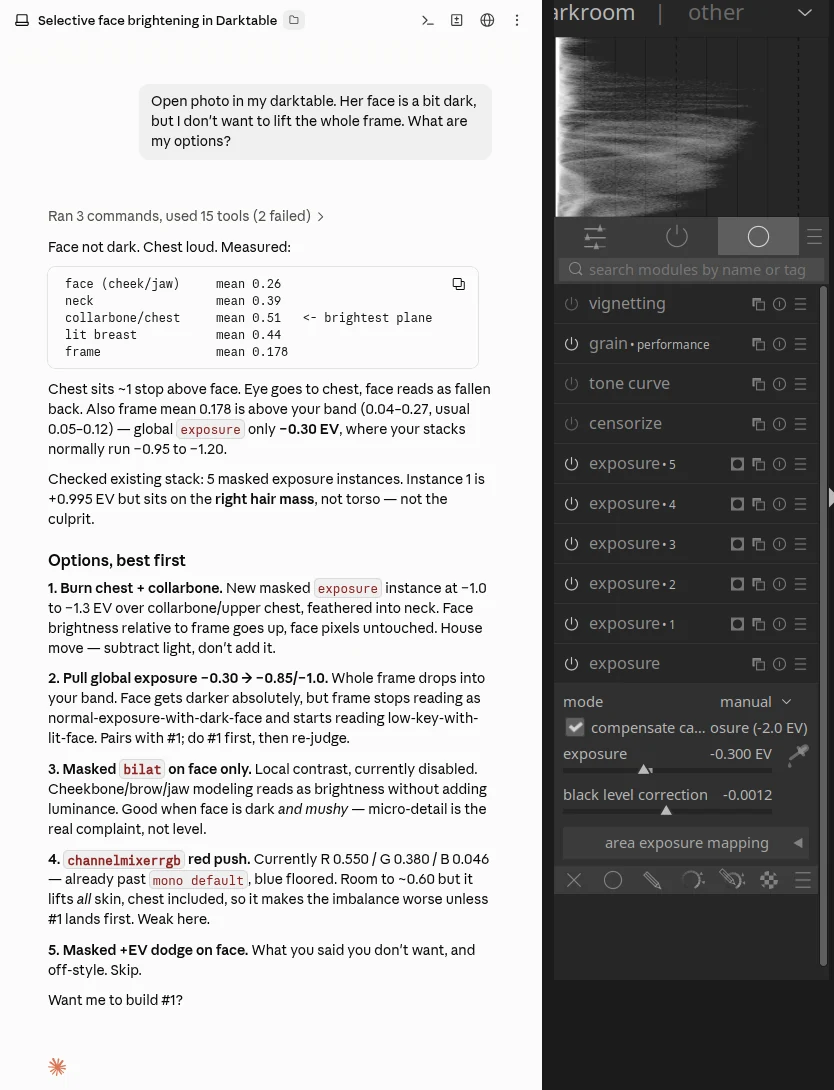
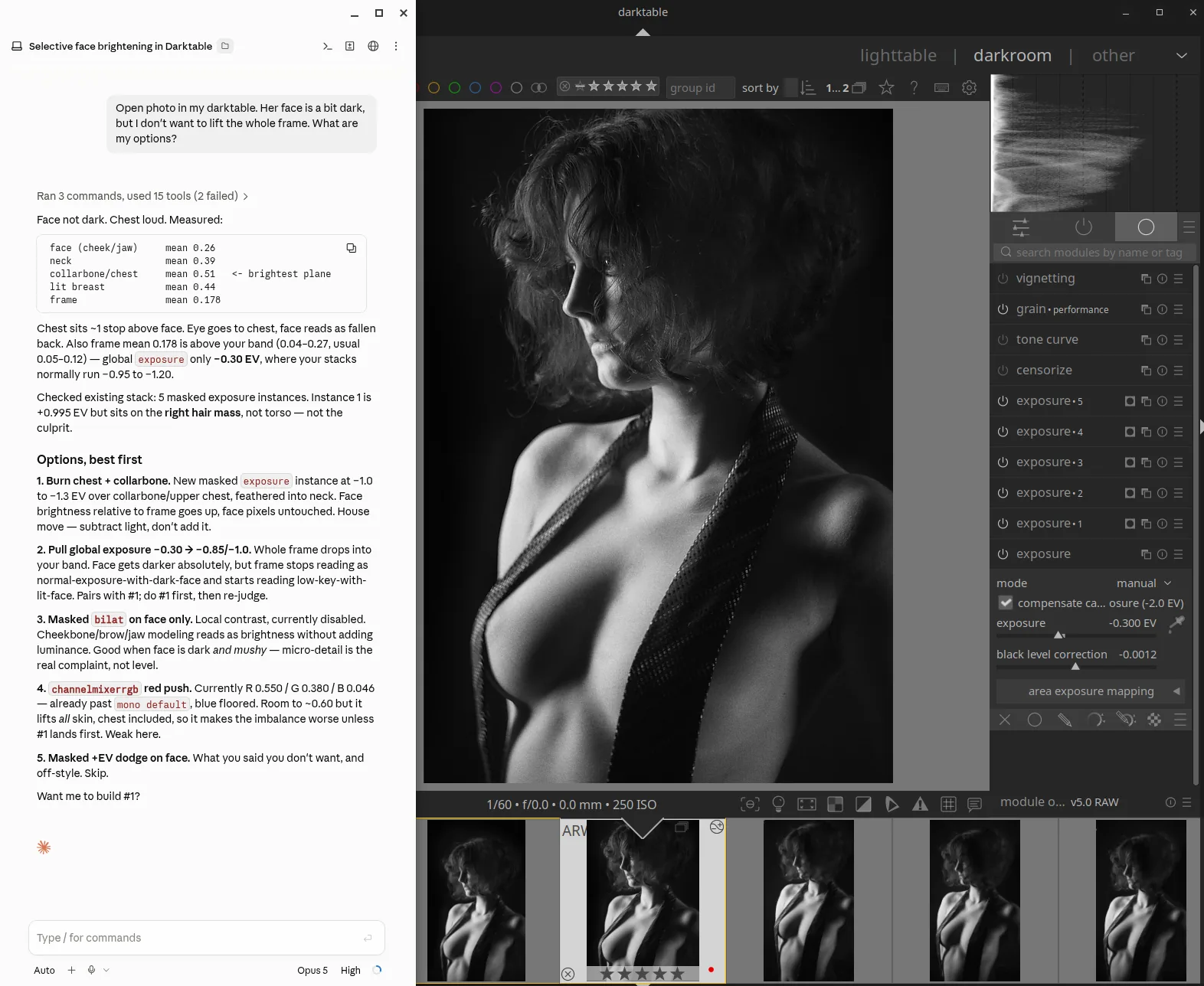
That is the record of who did what. Every entry the AI added is right there, in your own history stack, and removable. You can interrupt mid-thought, disagree, take the mouse and finish the mask yourself. If you stop talking, nothing else happens.
Culling and triage
A second pair of eyes on a whole roll
Before any editing decision, the AI can act as a curator: it looks at the shoot as a grid, says what it sees, and you decide what gets a rating.
Talk about a shoot without opening frames one at a time
One call renders a single labelled grid image from whatever collection is open in your lighttable, 25 photos in 5 columns by default, each cell carrying the filename, the image id and the current rating. The AI looks at that sheet and tells you what it sees: near-duplicates, the sharpest frame of a burst, the one where the eyes are open. Then you decide.
Ratings, tags and notes are separate, explicit calls, so nothing is applied until you say so. Contact sheets themselves are strictly read-only: they never touch ratings, tags, history or the darkroom. Notes land in the photo's Description field, so the AI's reasoning shows up in darktable itself and survives in the sidecar. You can disagree with it later and still see what it thought.
Then work through the roll without reaching for the mouse
Stepping to the next or previous photo in the open collection uses the same ordering as the contact sheet, and opens it in darkroom. Combined with the editing loop, "same idea on the next one, then show me" is a single turn, and you are still looking at every frame as it comes up. It errors at either end of the collection instead of wrapping around, so a walk through a shoot terminates cleanly.
Rating straight off the card, before importing anything
When darktable does not know about the shoot yet, there is a file-based path that needs no library and no GUI. It pulls auto-rotated JPEG previews plus EXIF out of the RAWs, the AI looks at them and proposes ratings, those ratings are written as XMP sidecars next to the RAWs, and only then does the GUI launch with the folder as a film roll, pre-filtered to the rating range you asked for. No SQLite poking, no half-imported state.
This is the one genuinely batch-shaped workflow in the project, and it is deliberately confined to triage, before any editing decision, with the GUI as the last step so you review the result yourself.
How it works
Three processes, and a file bridge into your running darktable
Your MCP client talks to a Python server, the server talks to a Lua worker loop living inside the darktable you already have open, and that worker calls C bindings that mutate the live pixelpipe.
Which clients it works with, and running it over the network
darktable-mcp is a standard Model Context Protocol server, not a client-specific plugin, so anything that speaks MCP can drive it. It is developed and used against Claude Desktop and Claude Code, and any other MCP-capable client connects the same way. What differs between clients is which model ends up seeing your session, and that is your choice, not the server's.
stdio is the default and the recommended local setup: the client starts the server as a child process on the same machine. For a client running elsewhere, the same server also speaks Streamable HTTP with a bearer token, bound to a host and port, so it can be reached over the network from another machine. Put it behind a TLS reverse proxy with buffering off.
One thing that does not change either way: darktable is still open in front of somebody. The transport moves where the client runs, not where the editing happens.
Two models at once, one editing and one giving a second opinion
More than one client can be connected at the same time. The bridge is a directory of request and response files, and the worker loop inside darktable picks up every pending request in turn and answers each one by its own id, whichever client wrote it. That makes a genuinely useful split: one model doing the edits, another looking at the photo you currently have open and telling you what it thinks of it, as a curator rather than an operator.
What the bridge does not do is isolate them. There is no per-client session: every call acts on whichever image darktable has open at that moment. One client editing and another observing behaves well. Two clients both making changes can surprise each other, because the second one inherits whatever the first just did, including a move to a different photo. Viewport snapshots already refuse to write when darkroom has moved on, but that is a guard on one class of mistake, not general isolation.
Why a long-running plugin and a file bridge, not a CLI shell-out
There is no headless one-shot path for library reads and writes. darktable-cli
does not load your library, and darktable --lua brings up the full GUI. So the
design is a long-running plugin inside your interactive session, plus a file bridge, rather
than a command-line invocation per call. That constraint happens to align exactly with the
design goal: the session you are sitting in front of is the session being edited. Nothing is
prepared behind your back and presented as finished.
Install
Two pieces: a patched darktable, and the MCP server
Stock darktable cannot expose its live darkroom state, so both halves have to be in place. Install the newest pair from the releases page.
1. Install both packages, patched darktable first
Download darktable-agentic 5.8.0+agentic.25 Download darktable-mcp 1.0.38
Both files are attached to GitHub Releases - darktable-agentic and darktable-mcp. The buttons above always point at the current pair; check the release pages for anything newer. Install in this order, substituting the filenames you downloaded.
sudo apt install ./darktable-agentic_*_amd64.deb   # patched darktable
sudo apt install ./darktable-mcp_*_amd64.deb      # the server, venv included
darktable-agentic declares Provides, Conflicts and
Replaces against the stock darktable package, so it cleanly
supersedes an existing install. darktable-mcp ships its own Python 3.12 virtual
environment and a launcher at /usr/bin/darktable-mcp, so nothing is downloaded
at install time.
2. Let darktable load the Lua bridge
From the packages the plugin is already installed, so you only have to opt in:
mkdir -p ~/.config/darktable
cat /usr/share/doc/darktable-agentic/luarc.snippet >> ~/.config/darktable/luarcThen start darktable and confirm the bridge came up:
darktable -d lua 2>&1 | grep -i mcp # must print: darktable-mcp bridge: ready
If that line is missing, nothing else will work. The usual cause is a stale or misspelled
require line earlier in your luarc: darktable aborts the rest of
the file at the first failing require, so a correct one after a bad line never
runs.
3. Register with your MCP client
Claude Code:
claude mcp add darktable /usr/bin/darktable-mcpClaude Desktop, in its config file:
{
  "mcpServers": {
    "darktable": {
      "command": "/usr/bin/darktable-mcp",
      "args": []
    }
  }
}darktable must be running whenever you use the darkroom tools. The server does not launch it for you.
1. Build the patched darktable
The fork does not change darktable's build system, so
upstream build
instructions apply verbatim against the agentic-mcp branch. Lua 5.4 must be
enabled, which it is by default: without it the namespace is not compiled in.
git clone --recurse-submodules -b agentic-mcp \
  https://github.com/rfordinal/darktable-agentic.git
cd darktable-agentic
./build.sh --prefix /opt/darktable-agentic --build-type Release --install --sudoInstalling to a separate prefix and running with a separate config directory is recommended, so this build does not share a database with your production darktable.
2. Install the server from a checkout
git clone -b agentic-mcp https://github.com/rfordinal/darktable-mcp
cd darktable-mcp
uv venv --python 3.12 .venv
uv pip install -p .venv/bin/python -e .
Python 3.10 or newer is required. darktable-cli must be on PATH
for exports.
3. Install the Lua plugin, then register the client
darktable-mcp install-plugin # copies the plugin, adds the require line to luarc
From a source checkout, point your client's command at the virtual
environment's interpreter with "args": ["-m", "darktable_mcp"].
Optional, whichever path you took: the SAM2 and MODNet sidecar
Object masks work without it, using the bundled GrabCut segmenter. Soft matte masks do not work without it. It installs into its own virtual environment with CPU-only torch, plus a SAM2 checkpoint and a MODNet ONNX model, deliberately not bundled in the packages.
darktable-mcp install-sidecarOptional, whichever path you took: remote or HTTP transport
stdio is the default and the recommended local setup, with the client starting the server as a child process on the same machine. For a client running on another machine, the same server speaks Streamable HTTP with a bearer token, bound to a host and port. Put it behind a TLS reverse proxy with buffering off.
DTMCP_BEARER_TOKEN=... DTMCP_PUBLIC_URL=https://your.host \
darktable-mcp --http --host 127.0.0.1 --port 8787 --path /mcpNote that this only changes where the client runs, not the arrangement: darktable is still open in front of somebody. Several clients can be connected at once and the bridge serves them all, but they share one darkroom state, so keep one of them the editor.
Status and maturity
What is solid, and what is not
Reproduced from the project's own README, per layer, unedited in substance. A page that hides the rough parts is not worth reading.
| Area | State |
|---|---|
| Library / cull / rate / tag / export / camera import | Working, inherited from upstream w1ne/darktable-mcp and extended |
| Scalar and array parameter editing, live preview | Working, acceptance-tested against a live darktable |
| Object masks via path mask | Working. Zero-install GrabCut segmentation is rough; SAM2 sidecar is the quality tier |
| Retouch heal/clone/blur/fill, circle/ellipse/path | Verified on a live darktable against a fixture library, incl. exact-revert on delete. Brush not yet supported. Not yet exercised against a large real library |
| Raster / matte masks | Newest and least exercised. The raster-injection binding started as a research spike, and this path is not hardened |
| Before/after baseline render | Partial, per-module A/B only, no session-start baseline |
| Interactive mask node editing (move/insert/delete points) | Not shipped. Written but unbuilt/untested; not exposed as tools |
| Remote HTTP transport + bearer auth | Working and opt-in; stdio is the default |
Packaged .deb install |
Built and validated on one Ubuntu 24.04 amd64 workstation. Other platforms: build from source |
This is a working tool used by its author on real photographs, not a released product with a support matrix. Expect to read error messages.
Safety and non-destructive behavior
You remain in control
-
Nothing is committed behind your back. Parameter writes go into the
in-memory history stack and reprocess. They are not written to
library.dbor XMP until darktable saves normally, and Ctrl+Z reverts the AI's changes like any other edit. - Nothing happens unprompted. The AI acts only inside a turn you started. There is no background pass over your library, no scheduled processing, no queue.
- Rendering a preview never writes. It grabs the live pipeline output, so it is safe to call as often as you like.
- Typed tools only. The AI never gets raw Lua or shell evaluation. The Lua bridge dispatches from a fixed method whitelist, and unknown methods error.
-
No direct database access, ever. Only official darktable APIs:
darktable-clifor export, the Lua API for everything else. Any contribution that reads or writeslibrary.dbdirectly is rejected. - Edits from a snapshot stay on that photo. A viewport snapshot records the image id, and a placement is refused when darkroom has moved on, because a coordinate from one frame means nothing on another.
- Failed local edits roll back. The mask tools clean up any module instance they created if a later step fails, so you never get an orphan instance in your history.
- Working on a duplicate is still your call. Live editing mutates the open image's real history stack. For experimental sessions, duplicate the image in darktable first.
FAQ
Questions people actually ask about AI photo editing in darktable
Can AI edit RAW photos in darktable?
Yes, with this project. An AI client reads the real module parameters out of the darkroom session you have open, writes a value back, renders the live pixelpipe and shows you the result. It is a conversation about one photo at a time, not a service you hand a RAW to. Stock darktable cannot do this on its own, which is why there is a patched fork underneath.
Does darktable have an AI assistant?
Not the kind described here, and not out of the box. darktable's stock Lua API exposes images, films, tags, styles and GUI actions, but not the live develop state: no module parameters, no history, no masks, and no readback of what the pipe produced. darktable Agentic is an independent, unaffiliated fork that adds that missing C-level API, plus a separate MCP server on top of it.
Can Claude control darktable?
Yes. darktable-mcp is a Model Context Protocol server, so Claude Desktop or Claude Code can be registered against it and then act inside your open darkroom: read parameters, set them, add masks, retouch, render a preview. Every change lands in your own history stack and Ctrl-Z reverts it like any other edit.
Can ChatGPT edit my photos in darktable?
darktable-mcp speaks standard MCP over stdio, with an opt-in Streamable HTTP transport and bearer auth for a remote client, so any MCP-capable client can drive it. The tools are developed and tuned against the models they are actually used with, and the client you pick is the one that decides which model sees your session.
What is an MCP server for photo editing?
MCP, the Model Context Protocol, is a standard way to give an AI client a set of typed tools it can call. A photo editing MCP server exposes editing operations as those tools. Here that means 47 tools covering darkroom parameters, masks, retouch, previews, culling, tagging and export, all of them acting on the darktable session running on your screen.
Is my photo uploaded anywhere?
The server is open source and runs on your own machine, and there is no photo editing cloud service in the loop: no image is sent to one. Be clear about the one part that is not local, though. Your MCP client talks to whatever model you configured it with, and previews are handed to that client so the AI can look at them. If that model is a hosted one, the renders go where your client sends them. A local model keeps the whole loop on your machine.
Can AI cull and rate my photos?
It can propose, and you decide. One call renders a labelled grid image of the collection open in your lighttable, 25 photos in 5 columns by default, and the AI reads that sheet and tells you what it sees: near-duplicates, the sharpest frame of a burst, the one where the eyes are open. Ratings, tags and notes are separate explicit calls, so nothing is applied until you say so, and the contact sheet itself is strictly read-only.
Can I use Claude and ChatGPT at the same time?
Yes, and it is a useful pairing. Several MCP clients can be connected at once: the bridge is a directory of request and response files, and the worker loop inside darktable answers every pending request by its own id, whichever client wrote it. So one model can do the edits while another looks at the photo you currently have open and tells you what it thinks of it, as a curator rather than an operator. There is no per-client isolation, though. They share one darkroom state, and every call acts on whichever image is open at that moment, so keep one of them the editor. Two clients both making changes can surprise each other.
Can I run the MCP server on another machine?
Yes. stdio is the default, where the client starts the server as a child process on the same machine. For a client running elsewhere, the same server speaks Streamable HTTP with a bearer token, bound to a host and port, so it can be reached over the network. Put it behind a TLS reverse proxy with buffering off. This only moves where the client runs: darktable is still open in front of somebody.
Does this replace Lightroom's AI features?
No, and it is not shaped like them. There is no one-click enhance and no unattended batch pass. This is a copilot: it proposes one small reversible step, applies it in your open darkroom, and shows you the render so you can react. What it does replace is the part where you have to remember which of darktable's modules does the thing you just described in words.
Do I need a GPU?
No. The core loop is parameter reads and writes plus darktable's own rendering, which is whatever your darktable is already doing. The optional mask sidecar installs into its own virtual environment with CPU-only torch, so SAM2 object masks and MODNet mattes run without a GPU. They are simply slower than they would be on one.
Why does it need a patched darktable?
Because there was no other way in. darktable-cli never loads your library and
cannot touch a live darkroom. dt.gui.action drives GUI widgets, so it is
focus-dependent and gives no readback of values or bounds. Writing XMP sidecars or poking
library.db bypasses the running instance entirely, so you see nothing until a
reload. The enabling work had to happen in C, as a new darktable.develop Lua
namespace.
Is it free and open source?
Yes, both halves. The darktable-agentic fork is GPL-3.0-or-later, as darktable itself requires. The darktable-mcp server is MIT, copyright w1ne, unchanged from the upstream project it forks. There is nothing to buy, no account, and no hosted tier.
Is darktable Agentic a darktable plugin?
Not in the usual sense. It is two pieces. One is a patched darktable, a fork rather than a plugin, because the parts it needs are not reachable from the stock Lua API and had to be added in C. The other is a separate MCP server process that your AI client talks to. There is a small Lua plugin in the middle, the bridge that runs inside darktable, but it only works against the patched build.
Does it work with stock darktable?
The darkroom half does not. Stock darktable's Lua API exposes images, films, tags, styles and GUI actions, but not the live develop state, so there is nothing there to read parameters or masks out of. That is the whole reason the fork exists. The card-side triage tools are the exception: pulling previews off a memory card, proposing ratings and writing XMP sidecars needs no darktable running at all, patched or otherwise.
Does it send my RAW files to Claude or OpenAI?
Your RAW file is never uploaded. What the AI sees is the rendered preview of the live pipeline, a PNG produced by your own darktable, handed to your MCP client so it can look at what it just changed. Where that goes is decided by the client you chose: with a hosted model the renders travel to that provider, and with a local one nothing leaves your machine. The server itself is local and sends images to no photo editing service.
Can I use a local model?
Nothing in the server assumes a particular model. It is a standard MCP server, so any client can drive it, including one pointed at a model running on your own machine. Be aware this is not where the project has been exercised: the tool descriptions are prompt surface, tuned against the models they are actually used with, and a smaller local model may need more spelled out than a larger one does. Treat it as untested rather than unsupported.
Which operating systems are supported?
The prebuilt .deb pair is built and validated on one Ubuntu 24.04 amd64
workstation. Everything else means building from source: the fork does not change
darktable's build system, so upstream build instructions apply verbatim, and the server
needs Python 3.10 or newer. Treat any other platform as untested rather than unsupported.
Can it batch-process my whole shoot?
No, and that is deliberate. It does not go off and process a folder unattended, and if you stop talking, nothing else happens. The one batch-shaped path is triage before any editing decision: pull previews off the card, have the AI propose ratings, write XMP sidecars, then launch the GUI on the folder so you review the result yourself.